TATTOOS ART |
Monday, May 19, 2014
|
Labels:
Gmail,
Google
You may have seen slightly less spam coming into your email inbox recently, but those messages were more likely than usual to contain a virus, according to a report by Google.
The amount of spam being transmitted dipped slightly in August and September, the study found. Spam in the third quarter of the year was down 24 percent compared to the same period last year, the report said.
In August viruses in emails processed by Google increased by 111 percent, compared to the same month last year, the company said in its statement. Google's system blocked a record-setting 188 million emails containing viruses in just one day.
This malware is increasingly being housed in messages purporting to break news about a celebrity's death. The virus can unleash itself when the recipient clicks on a file attached to an email.
For the study, Google analyzed more than 3 billion messages processed by its system each day during a three-month period.
TATTOOS ART |
Sunday, May 11, 2014
|
Labels:
Google,
Hacking
Users Should aware of Google TV Hackers because like Apple TV, Google's new TV platform is getting the attention of hackers: AndroidForums user Apeman made an attempt to root his Google-powered Sony Blu-ray player.
The video above shows how Apeman managed to get into the player's Recovery Menu by holding down the Power button. Note the System Update with USB there. This might allow hackers to gain root access to the Android-based Google TV OS, and potentially install apps onto it before Google launches the Android Market for Google TV next year.
Members on various Android and developer forums are currently debating all the cool apps and other custom hacks that could come into being if this hack works--imagine playing Angry Birds on your TV screen.
As we know Google have just launched its new search feature called Google Instant. Which is quite faster way of searching any thing in Google. So now Google introduces this facility of Google Instant in iPhone and Android mobile devices. Google Instant is now available on many U.S Mobile Devices.
According to the Google Blog, the Instant search option is presently on Android 2.2 devices, as well as iPhones and iPods running on iOS 4. As of right now, Google Instant is only available in English, although Google (Google) plans on adding more languages and bringing the service to other countries and devices.
In order to test out Instant's latest incarnation, one must tap the "turn on" link beneath the search box while visiting Google.com on a mobile device. Users are advised to wait for a bit and refresh the page if the "turn on" option isn't immediately visible.
Mobile Google Instant is similar to its desktop counterpart -- it offers a list predicting what users are searching for based on what they type. The first prediction's results will automatically appear on the screen. To access the remaining results, users just have to tap their fingers on the other listed predictions. If they press "enter" or the search button, the predictions will be skipped in favor of results that match the exact search terms.
The service, best designed to work on 3G and Wi-Fi networks, can also be enabled or disabled without causing users to leave the page they're on. All one needs to do is tap the "turn on" or "turn off" link.
Google Instant made its desktop debut in September, which is when a mobile sneak peek was also made available. By the end of the month, while in the midst of rolling out Instant to other countries, Google also added keyboard navigation to the service.
Check out this Demo video how Google Instant will Works on Mobile Device.
We know facebook is now introducing its new service call E-mail Inbox. Which is quite getting news from most of the Tech Experts that its a new battle between Google and Facebook.
Facebook is supposedly launching an email service this coming Monday and the hype is pretty high at this point. With many young users leveraging the Facebook inbox as their primary messaging service rather than email, why would Facebook find it necessary to launch their own email service on Monday? One answer is that Facebook needs access to the inbox to determine individuals’ true authority and influence.
If the rumors are correct, this might explain why Facebook and Google have been going at it recently with concerns to user data. Google has been preventing Facebook from importing Gmail data, and perhaps this is because such a feature would help people migrate from Gmail to Facebook email with ease.
Is Google right to be worried? We won't know for sure until Monday, but, in the meantime, here are five ways Facebook email could keep Gmail on its toes:
Smarter Conversation View
Groups Integration
Integrated Bios
Photo Slideshows
The "Like" in Links
Update:
Facebook has now updated its name server to publicly reflect that the company owns the domain name. Facebook would have to make it public within 24 hours of any product launch, which means that many people are now expecting Facebook to use the fb.com domain as part of any email product released on Monday.
Google has just unveiled its upcoming location based recommendation search engine "powered by you and your friends."
It's painfully obvious that location is one of the fastest-growing segments of the tech industry; Google has been iterating quickly in this area with improvements to Places, Images, Latitude and other services with location features. Its newest foray into the world of location-based services is Hotpot.
Hotpot takes all of Google Places' ratings and reviews features and adds a more personal touch. Currently, Place Pages mostly aggregate review data from sources such as Yelp.
With Hotpot, users will be encouraged to rate and review businesses directly from their Google-linked profile. Users' ratings and reviews are tracked with a counter at the top of each profile, and likes and dislikes are remembered and used in Google's recommendation engine.
In other words, it's aimed directly at average consumers, not web junkies who live to search. While Hotpot works well with Places data, its presentation is entirely fresh, both visually and functionally. It presents high-impact data (star ratings and images) for each place in a grid format without introducing too many details such as phone number or URL that might not be needed until the user decides to dig down another level or two.
Another part of Hotpot is its social features. Users can create a profile nickname to separate their Hotpot account from their general Google profiles (the whole web can see the Places nickname, but only friends will see the linked Google profile and the user's real name).
Google uses Gmail accounts and linked Google profiles to help users find their friends. Friends' reviews and ratings will be visible, and users will get recommendations based on what their friends like.
When you search for specific places, such as "sushi Berkeley," in Hotpot, you can filter your search results to see businesses or other places you haven't rated before; you can also choose to see only places that have been rated by your Hotpot friends.
TATTOOS ART |
Wednesday, July 11, 2012
|
Labels:
Google,
YouTube
YouTube is preparing itself for this weekend's big rollout of Google TV with a launch of its own: the full release of YouTube Leanback, its made-for-TV experience.
Leanback, revealed in May at the Google I/O conference, is a core component of Google's strategy to bring online video to the living room screen. It provides for a simplified YouTube experience and interface, offering simple keyboard commands, an advanced search interface, and a visual UI for browsing through YouTube clips and shows.
YouTube's television experience has been in beta as part of TestTube, the video site's version of Google Labs, but tonight the site will be available to the entire YouTube community. YouTube Product Manager Lead Kuan Yong told me earlier today that users will have access to the full catalog of YouTube videos. Kuan also told me that the team has been working on improving the user experience, search capabilities and adding other changes users requested during the beta.
YouTube Leanback is all about Google TV; it is the way the company wants users to experience YouTube while they are surfing the web on their TVs. When you select the YouTube bookmark in Google TV for the first time, you will be presented the option to make Leanback your default YouTube experience. This doesn't surprise us; Leanback was made for TV. It's less cluttered and easy to personalize. And now that Sony's Google TV-powered devices and the Logitech Revue go on sale this weekend, it's time for Leanback to roll out.
We're about to find out if consumers want the Internet on their TVs. Google hopes that people will do things such as favorite TED videos at work so they can watch them later at home. The company says that users of Leanback watch twice as much video as users of the regular YouTube interface. The company is hoping that statistic stays true as Google TV becomes available nationwide.
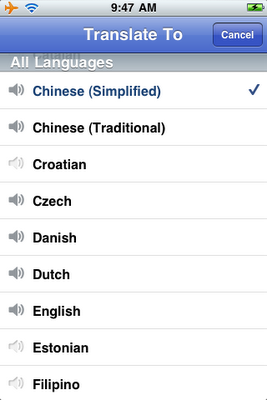
Google has now officialy released the Google Translate App for iPhone, this application is providing a feature with a text to translated text, and voice to text translations.
The new application allows for 15 supporters languages to be translated from voice to text. The application works by setting you spoken or written language at the top, and the translated to language next to it. To activate the translation, click on the microphone button beside the text box, and begin speaking.
The voice-to-text translations works for 15 supported languages, including English, French, Chinese, Japanese, Italian and many more. The text-to-text translation comes with over 50 supported languages, allowing you to translate just about any language in the world to your native language.
The application even comes with two handy features, such as full-screen mode, allowing you to magnify your translation to show off to your friends. The second neat feature, is the playback voice button. This feature allows you to play the translation back in any of the 15 supported voice languages.
Download Google Translate App for iPhone free from Apple App Store.
Just after seven weeks of introducing Chrome 9, Google has now released its new version of Chrome 10 web browser. Google has removed support for H.264 and adding in a 66% faster JavaScript engine in its new Chrome version. This new release is also features the new Crankshaft JavaScript engine which was included with the recent beta.
The big change is in the Chrome Options screen which has been revamped and will now, according to the official blog, "help you get to the right settings quickly so you don’t have to dig endlessly to find a way to import your bookmarks or change your browser’s homepage." Instead of using the traditional menus, users are now able to type the setting option into the address bar instead.
The removal of the H.264 codec may not come as a surprise to many as Google said they would cut it out earlier this year due to a patent issue with a group of companies including Microsoft. For HTML5 content the browser still has support for Theora and WebM codecs, both of which are open source.
A hacker with the name of Nir Goldshlager has posted the information and video showing how an attacker could quickly and easily gain administrative privileges to any Blogger account. The video show off some complex tricks and techniques. Goldshlager did mention that this was for the Google Reward Program,
The seven minute of video by Goldshlager shows how he successfully gained access to a blogger account by adding himself as an author (without the administrators approval), then sends himself a confirmation email, after which the attacker would become an author on the website. Following these steps, the attacker successfully modifies their permissions to become an administrator, allowing full access to add, edit, and delete all the content on the victims blog.
The blog doesn't mention if this vulnerability has been patched by Google or if Google is still unaware of the problem, as the exploit was only posted today.
Google has announced a new feature in its Search Engine called Website Blocking. Through which users can easy block any website which they think is not suitable for them in search queries and then website will not appear in search results in future for them. Users who use the search engine will start to see a new option, 'block all results', that means any future searches will not show any items from the desired domain name.
Users will also be able to change manage their settings with more detail using a new option within the Search Settings screen. From here new sites will be able to be blocked and existing preferences managed and updated. The blog continues to say, "We’re adding this feature because we believe giving you control over the results you find will provide an even more personalized and enjoyable experience on Google."
Google also claim they will be using this information to evaluate the blocks and see how relevant the selected domains will be to future rankings. The new feature is available to all English language searches on Google.com but only if you are using Chrome 9/10, Internet Explorer 8+ or Firefox 3.5+. Other languages and domain extensions are presently being rolled out and will be available soon.
Google once again comes up with its new feature Google Cloud Connect for Microsoft Office and giving advantage to MS Office customers to go beyond technology by using cloud service.
According to the Google Official Blog the new plug-in for Microsoft Office can be downloaded by everyone who have a Google Account. It allow users to sync all data of Office work from Microsoft Word, Excel and PowerPoint applications and upload them to Google’s cloud. From there all users can collaborate on the same versions of the files at the same time.
Cloud Connect for Office also has revision history and offline editing, letting you sync documents at a later date if you don’t have Internet access at the time of writing.
Google has also announced a 90-day Appsperience program that will let businesses test out all of the Google Apps for a small fee. The three month long test drive will cost $7,000 for companies that have 50 to 500 people or $15,000 for companies with more than 500 people.
Appsperience allows access to Google Apps, Google sites and to Google cloud connect along with new collaboration analytics that can be accessed directly through the Google Apps control panel.
As the Google Appsperience website states, at just $50 per user per year, the costs for using Google Apps for businesses is pretty low already, and the figures for the test drive don’t really show off the savings companies can make. The difference is that the Appsperience users can make use of additional support options that many businesses may well need when first starting out cloud based setups.
Google Cloud Connect can be installed on most versions of Office 2003, 2007 and 2010, but not with Office 2010 starter edition or any version that Microsoft’s Click-to-Run service has been used with.
Many Google Nexus S and Nexus One Smartphone users wants to update their software with latest release Android 2.3.3. Now Android users can download and install update manually of Android 2.3.3. Reports from Google suggested users could be waiting as long as a matter of weeks for the over-the-air update to land on everyone's handsets, but now the search giant has decided to allow eager punters to download the update and apply it manually.
If you want to be a lucky user to hold latest Android update of 2.3.3, here's how you can get the latest version of everyone's favorite mobile OS without waiting.
NOTE: We're hearing reports of the Nexus S update not working - it seems Google may have given us the incorrect update file. Hopefully the issue will be corrected ASAP!
Download the relevant update for your device: Nexus S and Nexus One.
Rename the downloaded Zip file to 'update.zip' - Nexus One owners MUST do this, while interestingly the Nexus S can flash from any file name.
Copy the renamed file to your phone's storage.
Turn your phone off. Now turn it back on while holding the volume DOWN (Nexus One) or volume UP (Nexus S) button.
Press the volume DOWN button to highlight 'recovery' and press the power button to select it.
Next you should see a yellow triangle with an exclamation mark - press the volume UP and power buttons simultaneously.
This last step depends on your phone - Nexus One users: use the trackball to select 'apply sdcard:update.zip”. Nexus S - Choose 'apply update from /sdcard and choose the update file.
After the above steps and a restart you should now be running Android 2.3.3. Welcome to Gingerbread, Nexus One owners!
Update: As pointed out in the comments, it appears Google hasn't so much released the update files as someone's managed to get hold of them. Either way the end result is the same, but it's still worth remembering that this isn't strictly 100% official!
If you'r looking for a promising job, then why not Join Google!. Google is hiring new comers in their organization, so if you want to build your career with world's largest and biggest company Google so join it today.
Today, Google post on their blog about latest induction in company. Google announced that they added 4,500 workers in 2010. This number is seems to be high but wait, it still comes second to 2007 when they added 6,000 new people. Now Google wants to expand their business even more and bigger with new employees, claiming this year will top 2007 and become their biggest hiring year in company history. Google says; "We’re looking for top talent across the board and around the globe and we’ll hire as many smart, creative people as we can to tackle some of the toughest challenges in computer science"
It seems that business must be going good at Google, however, which is buying small sites and startups (including failed attempt for GroupOn) pretty rapidly. The company acknowledged that new hires would work on what they consider startups within Google even though most of last year's hiring took place in engineering and sales. Google was quick to assure that there is a job for any interest.
If you think you’re eligible and wants to join the team, check out google.com/jobs.
After introducing Google Voice into iPhone, Google is now comes up with its new Google Voice Number Porting Feature for their users. Google is now currently testing a new feature for Google Voice called 'Number Porting', through which users will get the ability to port their existing landline or cell phone number over to Google Voice.
BGR reports that the new number porting feature is open to a selected number of Google Voice users, but it comes at a price. Google is charging a $20 number transfer fee, payable through Google Checkout. However, there may be other fees for transferring your number over. Your current landline or carrier may charge you an additional early termination fee, which could range in the hundreds of dollars to end a contract.
You can convert your number with a few clicks, you can have people call the regular phone number that you’ve been using all these years, without having to teach them to call a different number just so you can use Google Voice and all its Gmail like features. Simply click on Settings in the top right, then click voice settings, and finally, on the phone tab, click change / port. Click that and you’ll soon be done. Follow the two easy steps and pay the $20 transfer fee, and you'll have all your incoming calls forwarded to Google Voice.
Users with a contract should check with their carrier first, to ensure they aren't going to be nailed with an early termination fee.
Check out this Google Official Video for more information!
Now you can win upto $15,000 by entering in Doodle for Google Contest. Google have introduced its new Doodgle 4 Google contest for users in this year 2011. Google is running their 4th annual "Doodle 4 Google" contest for children in grades K-12.
The concept is simple, take your crayons and colored pencils and design a Google Logo that answers the question, "What I’d like to do someday..." Google will take all of the entries and partner with celebrity judges Whoopie Goldberg, skater Evan Lysacek, and "Garfield" creator Jim Davis to select the 40 best submissions. Those kids will then be flown to New York City and their work will be displayed at the Whitney Museum of American Art.
Google is really doing a great job in the public relations arena. By donating money to schools and children through this program, they are helping to build brand recognition at a very young age. Brand loyalty is very important in today's cut-throat business world, and with a simple doodling contest they're helping ensure that millions of children not only know about Google's search engine, but have a positive impression of the company as a whole, all for a budget of under $2,000,000.
Click here to Enter in Contest. The last date of Submissions Doodle 4 Google is March 16, 2011.
As we discuss before about Android Overtakes iPhone in U.S.A by 2011. So now Android has not stopped yet. Google is growing and have introduced its next version of its mobile operating system, Android 3.0 (codenamed Honeycomb), I have just got my hands on new promotional video of Android 3.0 by Google. The video of the tablet-friendly OS was posted by the Android Developers account, but was then set to private. Thankfully it has been reuploaded all over the Internet so whether Google meant to post it or not, the video is now widely available. Android version 3.0 is supposed to be a huge upgrade for tablets, and some rumors even claim it will be exclusive to the form factor, meaning not available for smartphones at all. The text "Entirely for Tablet" seen early in the video seems to support this. Beyond tablet exclusivity, the video shows the user interface, browser, e-books, optimized Gmail, redesigned YouTube, Google Talk, and Google Maps. Frankly, it doesn't even look like the Android we currently know.
Android for tablets will surely start to take off with Honeycomb, but what really has us interested is what this means for the mobile operating system as a whole. If Android 2.x is for smartphones and Android 3.x is for tablets, will Android 4.x converge the two? Google has some explaining to do!
"Many of Android's existing features will really shine on Honeycomb: refined multi-tasking, elegant notifications, access to over 100,000 apps on Android Market, home screen customization with a new 3D experience and redesigned widgets that are richer and more interactive," a Google spokesperson said in a statement. "We've also made some powerful upgrades to the web browser, including tabbed browsing, form auto-fill, syncing with your Google Chrome bookmarks, and incognito mode for private browsing. Honeycomb also features the latest Google Mobile innovations including Google Maps 5 with 3D interactions and offline reliability, access to over 3 million Google eBooks, and Google Talk, which now allows you to video and voice chat with any other Google Talk enabled device (PC, tablet, etc)."
As we told you in our post last year regarding Android overtakes iPhone by 2013, It seems that we were correct that time and now it seems that Android overtakes iPhone in early 2011. 61.5 million people in the US owned smartphones during the three months ending in November 2010, up 10 percent from the preceding three-month period. For the first time, more Americans are using phones running Google's Android operating system than Apple's iPhone, but RIM's BlackBerry is still in first place, according to comScore.
RIM fell from 37.6 percent to 33.5 percent market share of smartphones, Google captured second place among smartphone platforms by moving from 19.6 percent to 26.0 percent of US smartphone subscribers, and Apple slipped to third despite its growth from 24.2 percent to 25.0 percent of the market. Microsoft, in fourth place, fell into single digits from 10.8 percent to 9.0 percent while Palm was still last and further slipped from 4.6 percent to 3.9 percent.
What you have to say about this? Speak in comments!
Everything you want to know about Google Update for the month of January, 2011. Your every question would be covered in this Matt Cutts official video regarding Google Update Process for January, 2011. Matt Cutts (Google Software Engineer) have shared some useful information of Google Updates covering following topics.
When Google update Website Backlinks?
When Google update Website PageRank (PR)?
Google Fluctuation Update
Google Algorithm Update
Check out Matt Cutts Official Video of Google Update Process for the month of January, 2011.
TATTOOS ART |
Sunday, January 2, 2011
|
Labels:
Gmail,
Google
Have you deleted your Gmail contacts mistakenly? Or lost your Gmail contacts data accidently? Now you won't have to worry about your deleted Gmail contacts. Now you can recover and restore your Gmail Contacts easily without any problem. Google is now offering to Gmail users reverse any changes they have made to their Gmail contacts over a 30-days time period. That’s mean if you have deleted your Gmail contacts or have made any changes to your Gmail contact list within the past 30 days, you can go into your Gmail account and restore the desired version of your contacts list according to your preference.
This new feature will also come in handy if you’re trying to switch devices and sync contacts but accidentally end up deleting contact information from your Gmail account.
To try the feature out, just go to Gmail’s Contacts section and click on the “More actions” menu. From there, you can select “Restore contacts.” When you do, you’ll see a dialog box a lot like this one:
When you select a time frame, all of your Gmail contacts will be restored exactly as they were at that time. Any new contacts you’ve added since then won’t exist, and any contacts you had deleted will be back again. You can also undo a contacts restoration, if you like.
What do you think of this new Gmail feature? Let us know in comments
Now good news for Gmail users in New Year 2011, Google has announced that Gmail users are now able to make free phone calls to the U.S. and Canada and also make cheap phone calls over international calls (Call around the world for pennies per minute) When calling featured was added to Gmail back in August, the company said that it’d be making such calls free “for at least the rest of the year,” with per minute rates starting at $0.02 per minute for international dialing. The service made a major splash initially, with 1 million calls placed in the first 24 hours and pundits predictably calling the service a potential Skype killer. That said, we haven’t heard many updates about the traction the service is getting since then, though free calling for all of 2011 certainly stands to lure more users.
We’ve more good news from Google, So Stay Tuned and let us know in the comments if you’re making phone calls from Gmail.